
Table of Contents
Test ‘fake’ SD Flash cards/drives
Note: FakeFlashTest is a quick test for fake capacity flash drive – it does not thoroughly test all the memory in a flash drive.
FakeFlashTest (FFT) download (password is ‘fake’)
v1.1.5 is latest Beta (faster)
v1.1.2 for testing Flash-memory based drives (<2TB, 512e sector compatible disks only). – may be slow on large drives!
Unzip the password-protected download file using WinRaR or 7Zip – the password is ‘fake‘.
Must run with Administrator privileges or no USB drives will be listed.
Video
FAKE FLASH DEVICES
The most common problem you will have with flash memory devices is that they have been ‘faked’.
A 1TB flash drive or SD card for $30 is OBVIOUSLY A FAKE!!!
‘Gimmicky’ USB Flash memory devices and devices that are ‘too cheap’ will usually also be fakes (even if bought from a retail store or Amazon!)..
Note: FakeFlashTest was designed to quickly check if flash memory devices are fake (i.e. they have been programmed to lie about their size), it does not check all memory for faults..
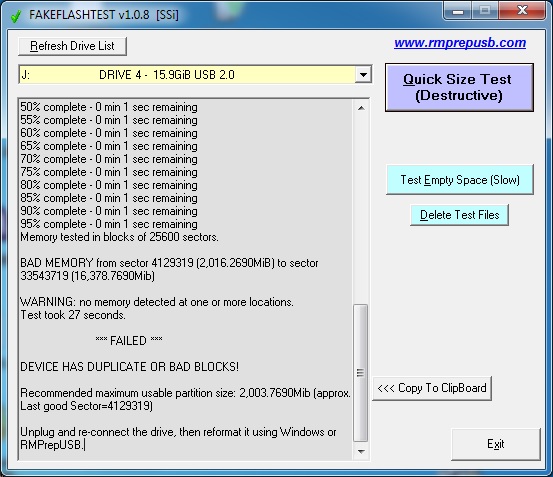
FakeFlashTest.exe – Diagnosed a fake 16GB USB Flash drive in 27 seconds!
Test your suspect ‘fake’ SD card or USB Flash drive in just a few minutes (rather than hours!) – read my blog.
FakeFlashtest downloads are at bottom of this page.
If Windows Defender blocks the download, you will need to download the password-locked zip file (password is ‘fake’).
Please Note: FakeFlashTest downloads on this page do NOT contain viruses (you can upload the .zip file to www.virustotal.com to check it for viruses).
Note: Some people have found that the FakeFlashTest Quick Size Test fails all the devices that they test. This seems to be due to something that has been installed in Windows (e.g. Anti-Malware or Anti-Virus software or perhaps a driver). If you reboot Windows in Safe Mode (press SHIFT key whilst clicking on Restart) and run FakeFlashTest in Safe Mode, the Quick Size Test should work correctly.
FakeFlashTest destroyed my flash drive\SD card!
You may find that your memory device ‘worked’ before you used FFT, but now you cannot reformat it.
FFT only reads and writes the normal, standard sectors on your memory device. It does not do anything ‘special‘ to the device.
The most common reason for failure to reformat is that you are trying to format it as an NTFS volume.
The reason it used to work when you first received it, is usually because it was originally formatted as FAT32.
The NTFS file system writes it’s ‘directory’ at about the 3GB point on a drive and also performs extensive checks at other points on the drive (e.g. backup sector at the end of the partition). If large files are written to an NTFS volume, the data will be written to sectors that are past the 3GB point on the drive (which may not exist!). If your device is fake, you may not be able to format it as NTFS. Also Windows will not let you format it as FAT32 if it is over 32GB in size.
A FAT32 file system keeps its directory, file entries and files at the bottom of the flash memory and fills the flash memory from the bottom upwards. By using FAT32, the thieves can avoid you detecting that the device is a fake until you have filled up the ‘real’ memory and by then you will have given them good feedback on eBay! That is why most fake USB drives are formatted as FAT32 instead of NTFS!
You can use RMPrepUSB to format it as FAT32 again (but it will still be faulty and corrupt your files!).
FFT has permanently killed my Flash drive!
If you cannot partition/format your USB drive at all or if Windows/Linux does now not even detect the USB drive then your device is now DEAD JIM! This often happens when sector writes are made to fake USB drives to sectors which don’t actually exist near the end of the large fake drive. For instance, the USB drive controller firmware is asked to write to a sector at 128GB but there is only 16GB of flash memory – the firmware/controller gets totally confused (because it has been hacked by the faker who does not have the necessary factory tools or skills to program it correctly) and so the drive ends up being a paperweight! Exactly the same thing would have happened once you wrote more than 32GB of files to it – it is just that FFT has done it first.
ValiDrive by Gibson Research
You may want to try this new fake flash program ValiDrive which can give good results in some cases (but may be slower).
It does not normally destroy data on the drive (if it is a good drive) and also measures speed (access to non-existent memory can be very fast or very slow compared to accesses to real memory!). Also note that drive performance cannot be compared just from the read/write timings.
Fill Test
If you don’t want to format your memory device, you can use this test, but be warned that if the device is a fake, then the test (which only copies files) can cause all your other files to be corrupted and lost!
By filling a drive with videos or large photographs, we can quickly ‘see’ if the files are corrupt by simply viewing them afterwards.
This test can take a while!
It makes folders named \TESTDIR1, \TESTDIR2, etc. and puts 100 copies of the test picture in each folder.
1. Find a large .BMP bitmap file or .JPG file or .PNG file (the larger the better – e.g. 10MB or larger!)
The test script will accept a TEST.MP3, TEST.MP4 or TEST.AVI file as the source file, but you may need to actually play them to check they are not corrupt.
2. Copy the file to your memory device and rename it as TEST – e.g. TEST.BMP or TEST.JPG or TEST.PNG, etc.
3. Copy the file CopyTest.cmd to the root of you memory device (unzip it first) – see bottom of page for download.
You should now have these two files on the root of your memory drive:
\TEST.BMP (a large .bmp or .jpg or .png file)
\CopyTest.cmd
4. Double-click on CopyTest.cmd and press ENTER to start the test
5. The test will stop when the drive has been completely filled with files. You can press CTRL+C at any time to abort, or press CTRL+S to pause the test and then view the files in Explorer.
You can resume the copy process by running CopyTest.cmd again.
6. Now view the last \TESTDIRn folder (e.g. \TESTDIR53) using Windows Explorer – View – Medium Sized Icons.
Check that all the thumbnails in each folder are displayed correctly. Note that there may not be 100 files in the last folder if the drive was full.
You can delete the \TESTDIRn folders when you have finished checking the thumbnails.
‘SD INSIGHT’ SMARTPHONE APP FOR SD CARDS
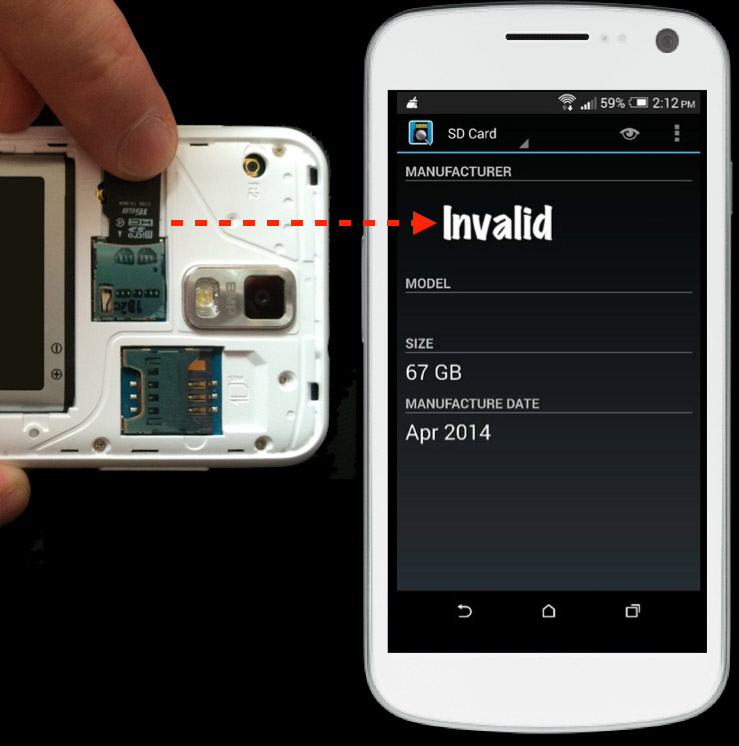
You can download the free Android app SD Insight from the Google Play App Marketplace which will reveal the manufacturers pre-programmed details of your SD card. This does not actually test the card, but it can give a good indication of whether the card is genuine or not.
There is also a Google Play free app. called ‘SD Card Tester‘ that will write a large file to your SD card (slowly!) and read it back (note: double-tap to change folder).
See here for many examples of fake SD cards and how to visually check one.
WHAT IS A ‘FAKE CAPACITY’ USB FLASH DRIVE OR SD CARD?
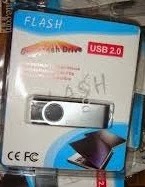
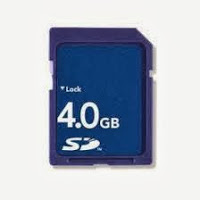
Many USB flash drives and SD cards are being sold on eBay and other auction sites at very cheap prices (too cheap!). These USB pens are usually of a high capacity (16, 32GB, 64GB or 128GB) and usually from the Far East, but some UK sellers also sell these too. 98% of these sellers are selling ‘fake’ USB Flash drives (fake UFDs) – either knowingly, unknowingly or I-don’t-really-want-to-know-ingly!
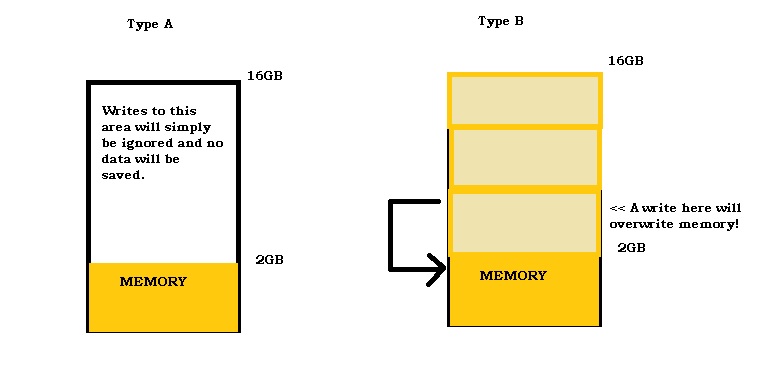
There are two types of ‘fake’ USB Flash drives…
Most Flash drive and SD cards are pre-formatted as FAT32. The directory and file names on a FAT32 device are all located in the first few MBs at the bottom of memory.
The actual file contents (data) are stored above the directory.
It is similar to how a book library uses library cards. The library cards are stored at the bottom of memory and the actual books are stored higher up in memory.
If you destroy the library cards, then you (Windows, linux, your camera/smartphone) cannot find any of the books.
FLASH MEMORY (FAT32)
- 2MB+ Actual file data
- 1MB File directory and names and a pointer to where the file contents are located
- 0 MB Partition table at bottom of memory
Type A
With a Type A device, you can copy 16GB of files to it and it will appear to have stored them all. If you look at the memory device using Windows Explorer, all the file names will be there and it will look fine. You will be able to access any files that are stored on the device up to the 2GB point. Any files stored after 2GB will be corrupt (probably all 0’s or 1’s).
Type B
These memory devices will appear to work until you put too many files on them (e.g. in the case above, if you put more than 2GB of files on it.) Once you exceed the true memory capacity, the next file that you write will actually start writing at 0MB which is where the file directory is located. This means that the file directory is now corrupt and you cannot access any files at all!
Be careful!
If you buy one of these fake UFDs or SD cards, they will appear to work fine and Windows will show them at their ‘rated’ capacity – for instance a 64GB UFD will appear in Windows to have a capacity of say 61.3GB, you may even give the seller positive feedback on eBay because they appear to work fine at first. However, these UFDs actually only contain about 2GB of real memory. When you start putting your files onto it, everything may appear to be fine – until you fill it up with more than 2GB and then it completely corrupts all the files on it! Bet you wish you hadn’t paid £20 for it now!
The fake product is usually made from a poor quality or defective smaller flash memory chip (and probably a 2nd rate ‘reject’ memory chip obtained from the trash can at the back of the factory!), but the controller has been programmed to falsely report it’s capacity as 64GB to Windows.
Don’t be caught by these cheats. Simply ask them to test the UFD using RMPrepUSB – Quick Size Test, FakeFlashTest or H2TESTW before you buy it. If they refuse then walk away from the deal! Explain to them that if the UFD passes H2TESTW they will get a lot more bids if they state this in their adverts.
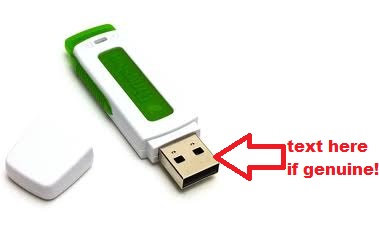
Do you have a fake Kingston Flash Drive? One simple way to check, is that usually Kingston print text onto the metal USB connector which has the model number and capacity + other numbers. If your Kingston drive has no printing on the connector, it may well be a fake!
Buying from eBay, Amazon, etc.
WARNING to all eBay and Amazon buyers – Always check the seller’s feedback – if anyone has given ANY neutral or negative feedback because of ‘corrupted’ data, then it is likely that all their products are counterfeit/fake. These devices will appear to work to start with, and do not fail until after you have left positive feedback!
Always test the memory using RMPrepUSB – Quick Size Test or FakeFlashTest before you use it. It would be a shame if you used a 64GB SD card for all your photos on that ‘once-in-a-lifetime’ holiday to Africa, only to find out that all your photos have gone! Also, please ensure you give the seller negative feedback and report them to eBay for selling fake goods – if they knowingly continue to sell fake goods they are criminals and don’t deserve good feedback! Also, get the eBay seller onto the eBay Fake Sellers list here.
Buying an SD card on eBay? – If you are buying an SD/SDHC card from an eBay seller, check the full description very carefully. Some sellers are advertising a ’16GB SD Class 10 SDHC card’ and then in the description say ‘these cards have been tested and may vary from 2GB to 32GB’ and ‘this is normal for cheap cards’ and even ‘the data you store will be compressed so don’t worry if you can only store 2GB as really you can store more’. This is all a load of rubbish! These cards are ‘fake capacity’ cards and have been deliberately manufactured to deceive the buyer! eBay seem quite content to allow these sellers to sell their fake goods and even allow them to pretty-much state that they are fake!
HOW TO TEST A SUSPECT UFD OR SD CARD
Here are some ways to check if your flash device is a fake.
See also ValiDrive.
ChipGenius
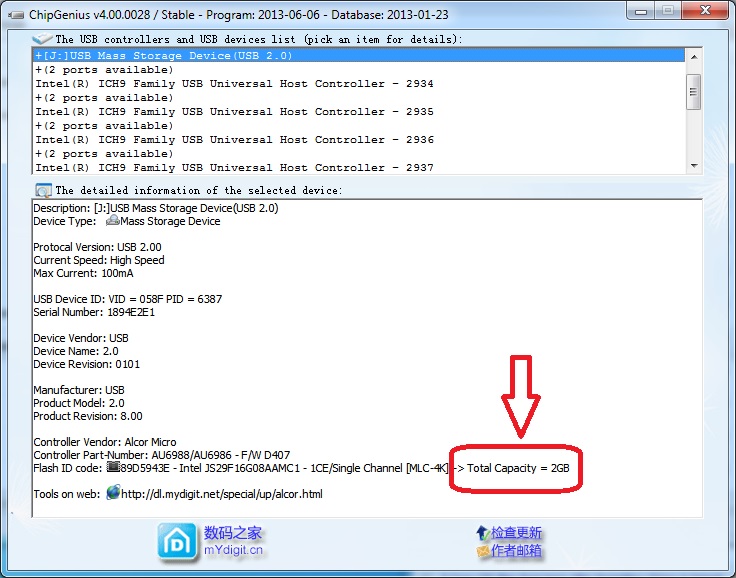
If you have a USB Flash drive, try using ChipGenius as a first test and very quick ‘test’. Often this will reveal the true size of the memory chips(s) fitted by the manufacturer. The screenshot below shows a fake 16GB USB Flash drive containing a JS29F16G08AAMC1 memory chip which is a 16Gb (Gigabit) or 2GB (GigaByte) memory chip. It therefore cannot possibly hold 16GB of data!
Tip: For testing SD cards, buy a USB 3.0 card reader from Amazon (#ad) – these really improve data transfer times (even if just using them on a USB 2.0 port). Cheap USB 2.0 card readers and integrated laptop card readers are notoriously slow!
FAKEFLASHTEST
FakeFlashTest was designed to test for these ‘fake’ memory devices. It does not test every bit of every byte, it just looks for missing chunks of memory and so is much faster than other tests.
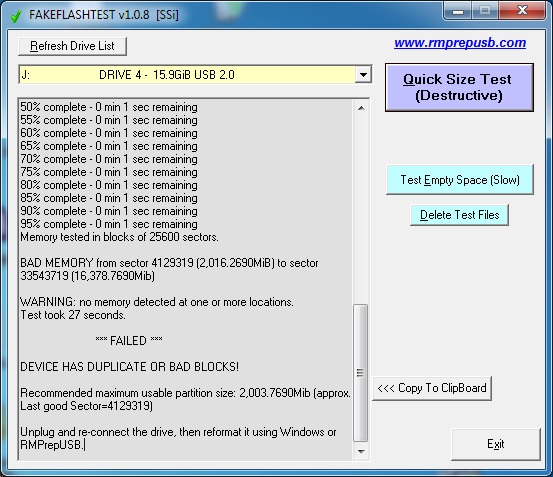
FakeFlashTest.exe diagnosed a fake 16GB USB Flash drive in 27 seconds!
This video shows a test of fake SD cards and a good 128GB SD card which took less than 30 seconds…
H2TESTW
If you have bought a ‘bargain’ UFD, you can test it using the ‘Gold Standard’ test H2TESTWwritten by Harald Bogeholz for c’t magazine. This test is very thorough but very slow because it tests all bytes of unused memory (even if it doesn’t exist).
The test utility is not included in the RMPrepUSB download but there is a link to the download on the RMPrepUSB help form – Just run H2TESTW.exe and select English as the language and the empty USB drive that you want to test. H2TESTW will fill up the empty, unused space on the UFD with large files but will not destroy any files that you already have on the UFD (but it you may lose all the files if the UFD is a fake one due to corruption!). The test can take 4-8 hours to test a good 16GB drive and considerably longer if it is faulty.
BE WARNED: If you already have photos/files on the memory device – copy them first (take a backup). Filling up the memory device with more files can cause the existing ‘good’ files to be corrupted and lost!
RMPrepUSB – Quick Size Test
A muchquicker test is to use the Quick Size Test button in RMPrepUSB (very similar in action to the first test in FakeFlashTest).
These tests destroy all data on the device and you will need to re-format the drive as FAT32 using RMPrepUSB after testing it, but a 16GB UFD can be tested in just 6-10 minutes.
Note that this is not a thorough test of all bits in the memory but it will certainly detect a ‘fake capacity’ memory product.
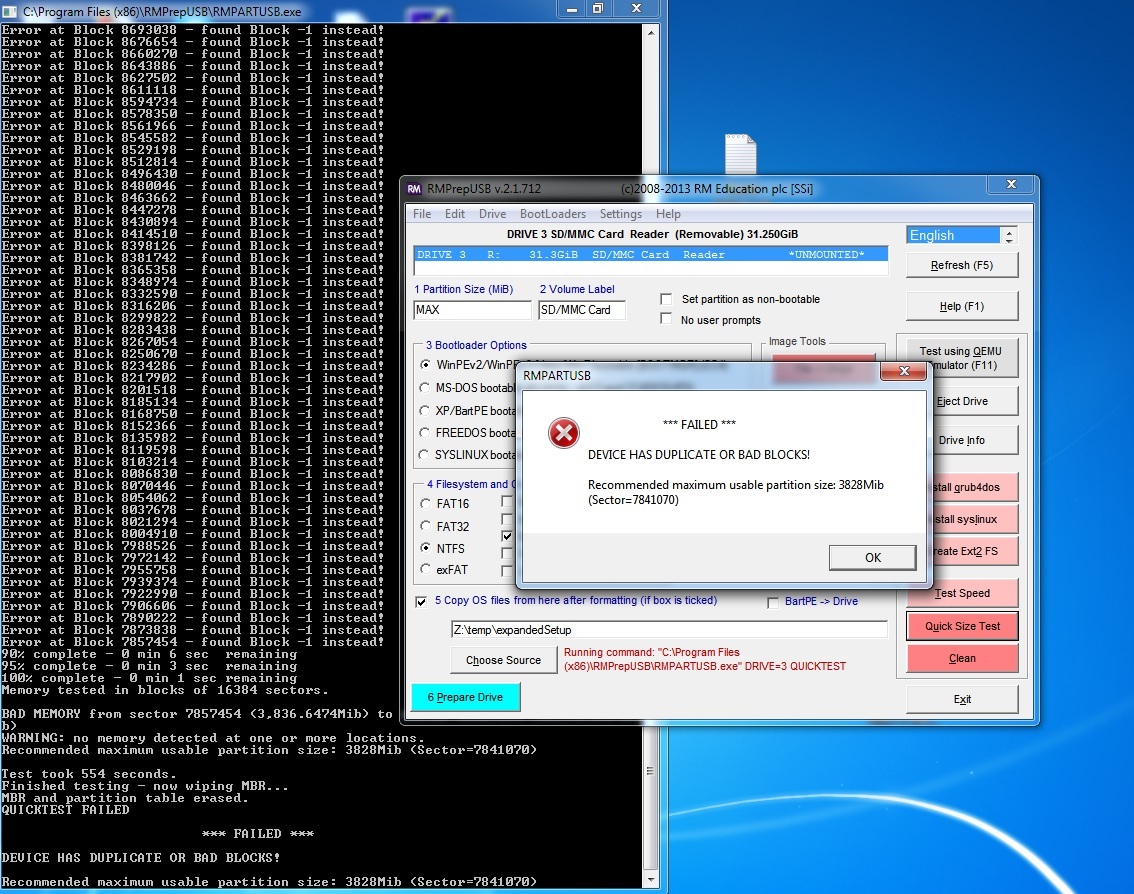
This flash drive was bought on eBay – 32GB SD Class 10 card that is actually only 4GB and wasn’t even Class 4!
See the bottom of this article for a typical result when testing a ‘fake’ flash memory drive.
If a Quick Size Test passes, then (if you have the time) you should reformat it and then test it twice with H2TESTW just to make sure the memory is all good quality (if you have the time!).
If it fails, the test will tell you the approximate true size of memory present (though the memory may be faulty/unreliable).
HOW TO REPAIR THE MEMORY DEVICE
I do not advise that you attempt to re-format or repair the device. Even if you get it for free – I suggest you throw it away or at least indelibly mark/scratch/chip it in some way so that you do not mistake it for a ‘good’ device!
To re-format it, you could set the SIZE box in RMPrepUSB with the reduced size and then reformat it as FAT32 to use what little memory is actually present – but don’t use it for anything important as quite often that memory is faulty or will develop a fault at a later date!
If you have a fake UFD, you cannot easily ‘repair’ them and even if you reformat them to their true (reduced) capacity using RMPrepUSB, the memory is probably of such poor quality (reject chips sold off by the factory as faulty) that it will sooner or later cause corruption of your most important files. You may not even realise your files are corrupt for months and may have lost the original files by the time you find out!
To reprogram a fake flash memory drive, you will need to find the manufacturer’s tool to re-program it with the true capacity – for an example on how to do this see Tutorial #39.
For more details about fake UFDs, see SOSFakeFlash website here.
As far as I know, there are no ‘repair’ or reprogramming tools available for SD cards.
After, re-programming or reducing the size, always retest it using H2TESTW before you use it.
PROBLEMS ACCESSING THE DEVICE?
If you have a USB Flash Drive that does not seem to work with Windows and causes the computer to slow up or stop responding whenever you try to use it or access it – please read the Tutorial #23 here for instructions on how to fix it.
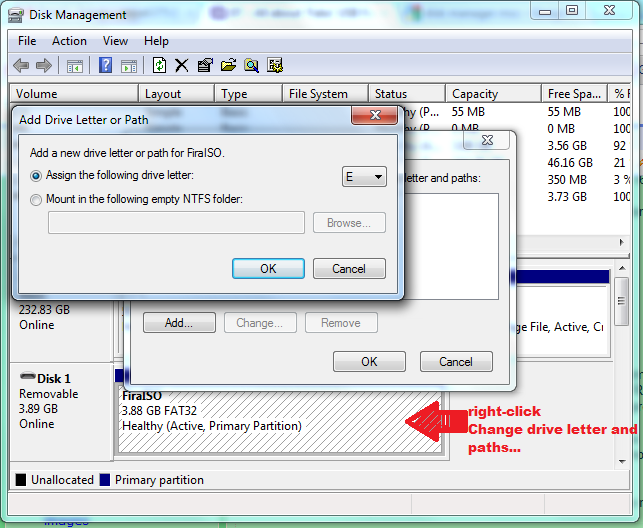
If your USB Flash drive does not seem to format using RMPrepUSB, check that Windows has assigned it a drive letter. If not use Drive Manager to add a drive letter to the drive. The easiest way to access the disk management console is go to Start-Run and enter “diskmgmt.msc” right-click on the USB drive area and choose ‘Change drive letter and paths…’ – then add a drive letter.
TEST RESULTS
Here is a typical ‘fake’ flash drive bought from China off eBay. It was sold to me as a 16GB Flash drive and has 16GB printed on it.
However, it is actually a 2GB Flash chip mapped 8 times into a 16GB address space – writes past 2GB don’t actually store the data but just report back ‘OK’ – hence writes and reads from 16GB to 2GB are very quick!
COMMAND LINE: drive=2 quicktest
RMPARTUSB v2.1.631 (c)2011 RM Education plc [SSi]
=================================================
Accessing Drive 2 – “USB 2.0” (17,179,869,184 bytes)
Writing marker blocks to drive 2
5% complete – 0 min 1 sec remaining
10% complete – 0 min 1 sec remaining
15% complete – 0 min 6 sec remaining
20% complete – 0 min 4 sec remaining
25% complete – 0 min 4 sec remaining
30% complete – 0 min 3 sec remaining
35% complete – 0 min 2 sec remaining
40% complete – 0 min 2 sec remaining
45% complete – 0 min 2 sec remaining
50% complete – 0 min 2 sec remaining
55% complete – 0 min 1 sec remaining
60% complete – 0 min 1 sec remaining
65% complete – 0 min 1 sec remaining
70% complete – 0 min 1 sec remaining
75% complete – 0 min 1 sec remaining
80% complete – 0 min 1 sec remaining
85% complete – 0 min 1 sec remaining
90% complete – 0 min 2 sec remaining
95% complete – 0 min 2 sec remaining
100% complete – 0 min 1 sec remaining
Reading back marker blocks…
Error at Block 33554431 – found Block -1 instead!
Error at Block 33538047 – found Block -1 instead!
Error at Block 33521663 – found Block -1 instead!
Error at Block 33505279 – found Block -1 instead!
Error at Block 33488895 – found Block -1 instead!
Error at Block 33472511 – found Block -1 instead!
Error at Block 33456127 – found Block -1 instead!
Error at Block 33439743 – found Block -1 instead!
Error at Block 33423359 – found Block -1 instead!
Error at Block 33406975 – found Block -1 instead!
Error at Block 33390591 – found Block -1 instead!
Error at Block 33374207 – found Block -1 instead!
Error at Block 33357823 – found Block -1 instead!
Error at Block 33341439 – found Block -1 instead!
(lots more errors here!)
Error at Block 4227071 – found Block -1 instead!
Error at Block 4210687 – found Block -1 instead!
Error at Block 4194303 – found Block -1 instead!
Error at Block 4177919 – found Block -1 instead!
Error at Block 4161535 – found Block -1 instead!
Error at Block 4145151 – found Block -1 instead!
Error at Block 4128767 – found Block -1 instead!
90% complete – 0 min 1 sec remaining
95% complete – 0 min 1 sec remaining
100% complete – 0 min 1 sec remaining
Memory tested in blocks of 16384 sectors.
BAD MEMORY from sector 4128767 (2016.0Mib) to sector 33554431 (16384.0Mib)
WARNING: no memory detected at one or more locations.
Recommended maximum usable partition size: 2007Mib (Sector=4112383)
Test took 50 seconds.
Finished testing – now wiping MBR…
MBR and partition table erased.
QUICKTEST FAILED
*** FAILED ***
DEVICE HAS DUPLICATE OR BAD BLOCKS!
Recommended maximum usable partition size: 2007Mib (Sector=4112383)
I have put a lot of hours of hard work into FakeFlashTest and it is totally free!
If FFT has saved you from a disaster, please consider making a small donation, it would be much appreciated!
DOWNLOADS
If Windows Defender blocks the download, you will need to download the password-protected file.
The password is ‘fake‘ (lower case without quotes).
Please Note: FakeFlashTest downloads on this page do NOT contain viruses (you can upload the .zip file to www.virustotal.com to check it).
FakeFlashTest is FreeWare and can be freely used or distributed by anyone. The developer cannot be held responsible for any data loss or misuse.
Keywords: USB, corrupt flash drive, thumb drive, not responding, slow, freeze, hang, stop, access, bad, cheap, fake, pen drive, size, capacity, china, hong kong, taiwan
v1.1.3 2022-07-06 may work for larger Flash memory-based drives.
