
This procedure can be used for the Winternals Administrators Pack.
An old expired version of the ISO can be downloaded from here. Use 7Zip on the downloaded msi file to extract the erd50.iso file. If you run the msi file on an x86 system you may get a 30-day trial version of the ISO (untested).
You can boot from the XP based Winternals Emergency Repair Disk Commander 2005 or 2007 ISO from USB in one of two ways, either:
1. Directly from a flat file structure (the files from the ISO are extracted to the USB drive) – or –
2. Directly from the ISO file on the USB drive
Brief instructions are provided for each of these two scenarios below:
1. DIRECTLY FROM A FLAT FILE STRUCTURE
1. Use the latest version of RMPrepUSB (must be v2.1.644 or later) and set the filesystem to NTFS (recommended but not essential), select the ISO in the 5 Choose Folder/File box and tick the BartPE->Drive as below, then click on 6 Prepare Drive to format and make the USB drive in one simple step.
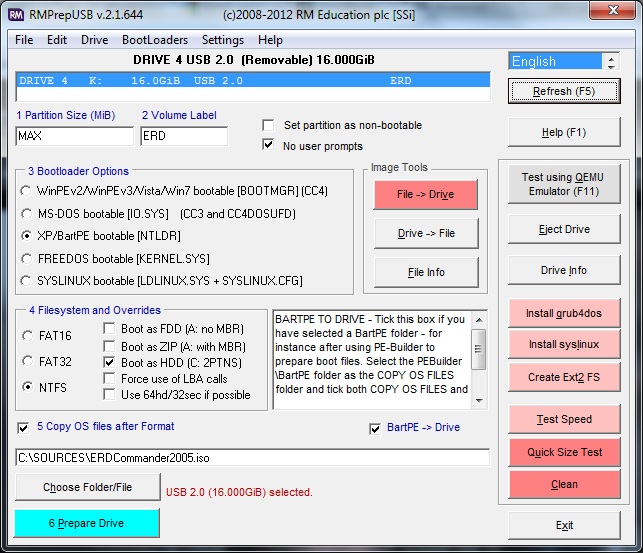
Note that the ERD ISO file is selected in Item 5
If you are using an earlier version of RMPrepUSB, you will need to extract the ISO to a folder on your hard disk and set the 5 Copy OS files text box to that folder.
2. DIRECTLY FROM THE ISO FILE
Note: This method is also available using Easy2Boot (use the file extension .isomemF01)
1. Copy the ERD ISO files, e.g. ERDCommander2005.iso to your bootable USB drive (you can prepare a bootable USB drive using RMPrepUSB)
2. Install grub4dos to the USB drive using RMPrepUSB – Install grub4dos
3. Download and copy the file WinVBlock.IMG.gz (see end of this article) to the root of the USB drive
4. Create a new menu text entry in the menu.lst file (press F4 in RMPrepUSB to edit/create the file) as below:
- default 0
- timeout 10
- title ERD commander 2005 ISO via WinVblock
- map –mem /ERDCommander2005.iso (0xff) || map /ERDCommander2005.iso (0xff)
- map (hd0) (hd1)
- map (hd1) (hd0)
- map –mem /winvblock.img.gz (fd0)
- map –mem /winvblock.img.gz (fd1)
- map –hook
- root (0xff)
- chainloader (0xff)/I386/setupldr.bin || chainloader (0xff)
- title ERD Commander 2007.iso
- map –mem /ERDCommander2007.iso (0xff) || map /ERDCommander2007.iso (0xff)
- map –mem /winvblock.img.gz (fd0)
- map –mem /winvblock.img.gz (fd1)
- map (hd1) (hd0)
- map (hd0) (hd1)
- map –hook
- chainloader (0xff)/I386/setupldr.bin || chainloader (0xff)
- title Vista, Win7, Win8 based ISOs MSDaRT etc.
- map /ERD6.5.iso (0xff)
- map (hd1) (hd0)
- map (hd0) (hd1)
- map –hook
- chainloader (0xff)/bootmgr || chainloader (0xff)
You can test your USB drive using the Test using QEMU Emulator button in RMPrepUSB or go test it on a real system!
Click here (OneDrive folder) if you cannot find any file mentioned in the articles on this site or Contact Me.
